Tips and Tricks for Using OKX V5 API (1)
Introduction
When OKX launched the Unified Account Trading system, it also upgraded the API from V3 to V5, bringing more and improved features. This article explains the changes in V5 API compared to V3 API, as well as tips and tricks for configuring your account before trading.
Changes in V5 API
Unified API Across Products
One of the changes in V5 API is that all products use a unified API. Whether placing orders or viewing position information, the API is no longer segmented by product like V3 API.
For example, when placing an order, you only need to connect to the following URL and specify the product type in the request body:
POST /api/v5/trade/order
Any product type uses the same request and response format through the unified API. In other words, you no longer need to create separate API models for each product.
Shorter Naming Conventions
V5 API fields use camelCase and abbreviations, which saves more bandwidth and memory overhead.
Examples:
Field
V5 API
V3 API
Currency
ccy
currency
Instrument ID
instId
instrument_id
Underlying
uly
underlying
Unrealized PnL
upl
unrealized_pnl
Standard WebSocket Data Compression
V5 API uses the standard WebSocket compression extension "Per-Message Deflate". You no longer need to manually decompress WebSocket messages as you did with V3 API.
To use WebSocket data compression, check if your client has the relevant extension enabled. When enabled, the request header should include "permessage-deflate".
Public and Private WebSocket
WebSocket channels are now divided into two categories: public channels (e.g., market data, candlesticks) and private channels (e.g., account, positions).
The two types of channels require different URLs to connect. You do not need to send a login request when connecting to public WebSocket channels; otherwise, the subscription will fail.
Placing Orders via WebSocket
In addition to REST, V5 API introduces WebSocket order placement/modification/cancellation. For details, please refer to the API documentation or Part 2 of this article.
Login
V5 API REST login is the same as V3 API (i.e., adding a signature to the REST request header).
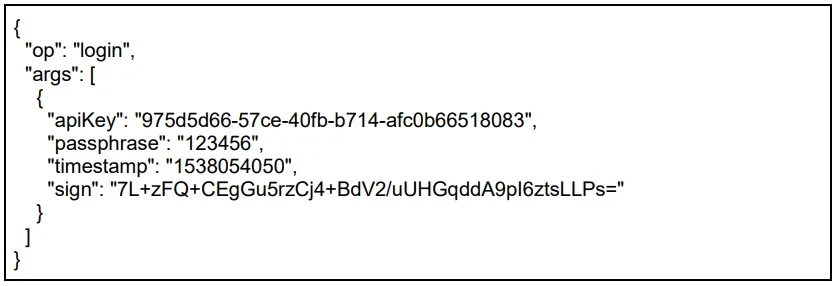
V5 API WebSocket login is also similar to V3 API (i.e., sending a login request), but the format has been changed to key-value pairs:
Creating Sub-Account API Keys
When using a parent account (i.e., main account), you can now perform CRUD operations on sub-account API Keys through V5 API (create, read, update, delete).
Create
POST /api/v5/users/subaccount/apikey
Read
GET /api/v5/users/subaccount/apikey
Update
POST /api/v5/users/subaccount/modify-apikey
Delete
POST /api/v5/users/subaccount/delete-apikey
We strongly recommend binding IP addresses to your API Keys to enhance account security.
Configuring Accounts
After completing the creation of sub-accounts and API Keys, the next step is to configure each account.
Account Configuration
You can view the current account/sub-account configuration through the following REST API:
GET /api/v5/account/config
The API will return: (1) account mode, (2) position mode, (3) automatic borrowing settings, and (4) options Greeks PA/BS configuration.
Account Mode
OKX Unified Account Trading system provides multiple account modes: (i) Simple mode, (ii) Single-currency margin mode, (iii) Multi-currency margin mode.
Since changing the account mode requires user action, it can only be changed on the web page.
Position Mode
OKX Unified Account Trading system introduces a new one-way position mode (buy/sell mode) and also retains the original two-way position mode (open/close mode):
One-way Position Mode
You can only hold a long or short position. The trading engine will automatically open/close positions based on the position quantity you specify
Two-way Position Mode
You can hold both long and short positions simultaneously
You can set the position mode through the following REST API (all positions must be closed before setting):
POST /api/v5/account/set-position-mode
Automatic Borrowing
Automatic borrowing is a feature under the multi-currency margin mode and can only be changed on the web page.
Options Greeks PA/BS
Similar to V3 API, you can set options Greeks PA/BS through the following REST API:
POST /api/v5/account/set-greeks
Cross Margin / Isolated Margin Mode
The cross margin/isolated margin settings in OKX Unified Account Trading system are more flexible. You can trade the same product using both cross margin and isolated margin simultaneously.
Therefore, V5 API does not have an API to set the underlying margin mode. Instead, you need to specify the margin mode (trading mode) for each order when placing orders. For details, please refer to the API documentation or Part 2 of this article.
Leverage
Getting Leverage
You can get leverage through the following REST API:
GET /api/v5/account/leverage-info
Currently, there is no global leverage setting. The same product can have several leverage setting scenarios.
Spot Grid:
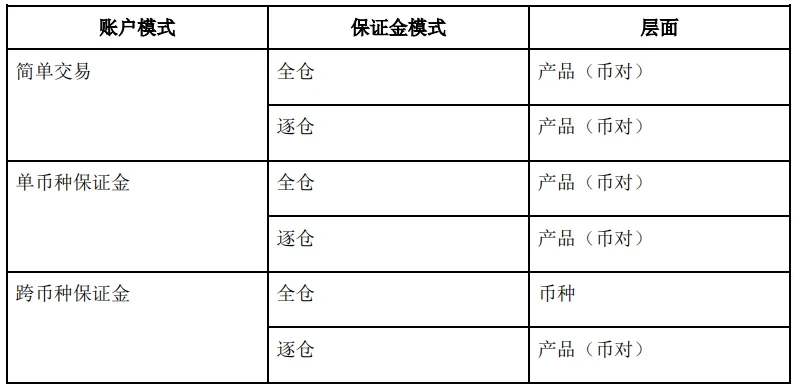
Other product types:
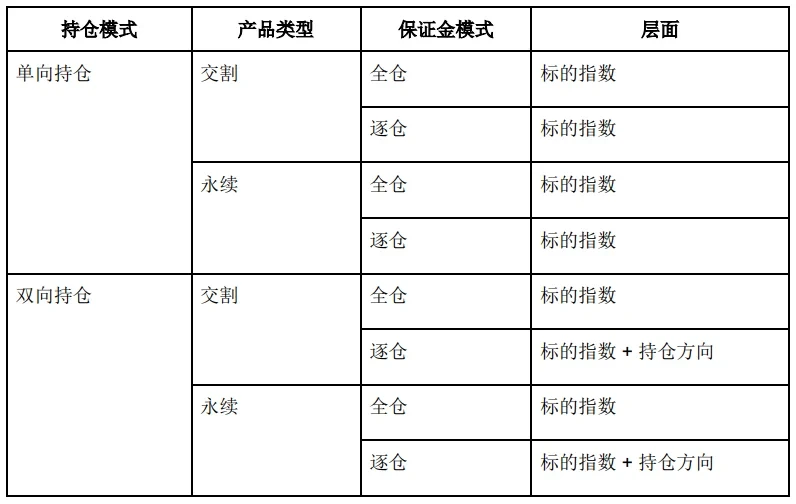
Setting Leverage
After getting the leverage, you can set it according to your needs:
POST /api/v5/account/set-leverage
You can use the two APIs above to write a program to pre-set the leverage for each product before trading.
Example:
Assume we have the following settings and requirements:
-
Account mode: Multi-currency margin
-
Position mode: One-way position
-
Products that need leverage set to 3.0:
-
The above products only use cross margin mode
For spot/spot grid, the setting scope is by currency. You can extract the currency to set one by one, i.e., BTC, USDT, EOS, and LTC.
Example request body for setting BTC currency leverage to 3.0 (applicable to selling BTC-USDT and buying LTC-BTC):

The request bodies for setting USDT, EOS, and LTC are very similar and will not be listed here.
Next, set the leverage for BTC-USD-210319, BTC-USD-210326, and BTC-USD-210625. Since these three products share the same underlying (BTC-USD), you only need to set the leverage for one of these three products.

Finally, we need to set the leverage for BTC-USD-SWAP. Although the underlying is the same as the delivery contracts above (BTC-USD), the leverage settings for delivery and perpetual contracts are separate and independent. We still need to send the following request body to set it:

After sending these 6 API REST requests, the leverage settings for all 8 products are complete.
Summary
By applying the tips and tricks above, you should be able to use the new API to set up sub-accounts, and also configure various account settings such as position mode and leverage to suit your trading style.
In the next part, we will cover tips and tricks for using V5 API in trading, such as placing orders via WebSocket and reconciling trade execution notifications with positions.
Since OKX will continuously improve the Unified Account Trading system, the ideas mentioned above are subject to change. Please refer to V5 API documentation for the latest specifications: Market Maker Application
Click to View "Tips and Tricks for Using OKX V5 API (2)"
Disclaimer
This article may contain product-related content that does not apply to your region. This article is intended solely to provide general information and does not accept responsibility for any factual errors or omissions. This article represents the author's personal views and does not constitute the views of OKX. This article is not intended to provide any advice, including but not limited to: (i) investment advice or investment recommendations; (ii) offers or solicitations to buy, sell, or hold digital assets; or (iii) financial, accounting, legal, or tax advice. Holding digital assets (including stablecoins) involves a high level of risk and prices may fluctuate significantly or even become worthless. You should carefully consider whether trading or holding digital assets is suitable for you based on your financial situation. For questions specific to your circumstances, please consult your legal/tax/investment professional. The information in this article (including market data and statistical information, if any) is for general reference purposes only. While we have taken all reasonable precautions in preparing such data and charts, we do not accept any responsibility for factual errors or omissions expressed herein. © 2025 OKX. This article may be reproduced or distributed in its entirety, or excerpts of 100 words or less may be used, provided that such use is non-commercial in nature. Any reproduction or distribution of the full article must prominently state: "This article is copyrighted © 2025 OKX, used with permission." Permitted excerpts must cite the article name and include attribution, e.g., "Article name, [author name (if applicable)], © 2025 OKX". Some content may be generated or assisted by artificial intelligence (AI) tools. Derivative works and other uses of this article are not permitted.
Show More
Recommended Reading
Profit Even When Bitcoin Drops? How to Trade Contracts
As the cryptocurrency market, led by Bitcoin, continues to expand, various forms of derivatives trading have gradually emerged alongside spot trading as a hedging tool. Among them, contract trading has attracted the most attention. What is contract trading? Contracts are the most common trading instrument in the cryptocurrency derivatives market. Digital assets contract trading refers to buyers and sellers agreeing to trade a certain asset at a specified price at a future time.
January 16, 2026
Simpler Than Copying Strategies? Follow the Best Strategy Traders with One Click on OKX, Let Traders Make Money for You
Whether in traditional finance or the cryptocurrency market, strategy trading is a very important and key method in the trading system. When facing complex trading environments and extreme market conditions, even with solid theoretical knowledge and rich trading experience, it is easy to miss trading opportunities or make wrong decisions and operations due to emotions. Strategy trading is an effective tool to solve these problems. With trading tools ready, how do you
November 21, 2025
5. Strategic Trading Series — Recurring Buy Tool
Preface: We often have this thought: During a bull market, there are many digital assets that surge. If we could continuously capture coins with large gains, for example, capturing one coin that doubles every month, your assets would become 2 to the 12th power, or 4,096 times, after a year. This is quite astonishing, but it is also almost impossible to achieve, as it is very difficult to continuously catch surging coins. This is also a problem many users encounter: during a bull market, although
November 3, 2025
Which Countries/Regions Do Not Support Registration for OKX
OKX currently does not provide services to customers in the following regions: certain US territories such as New York, Texas, Puerto Rico, American Samoa, Guam, the Commonwealth of the Northern Mariana Islands, the US Virgin Islands (St. Croix, St. John, and St. Thomas), Cuba, Iran, North Korea, Crimea, Malaysia, Syria, Bangladesh, and Bolivia. For more details, please refer to the OKX Terms of Service.
April 25, 2024
Quick Guide to OKX Common Products and Features
OKX (www.okx.com) is one of the world's renowned digital assets service platforms, primarily serving global users with Bitcoin, Ethereum, and other digital assets spot and derivatives trading services. It also explores DeFi, dApp, NFT, and GameFi with its users. On OKX, you can enjoy smooth spot, contracts, and other trading experiences, stay updated on tokens in hot sectors/concepts first, and also
April 25, 2024
Learn Candlestick Charts from Zero | The Importance of 5 Candlestick Pattern Applications
Trends exist in price movements; understand the language of prices. Signals exist for buying and selling; goodbye to gut-feeling trading. Part 1: Bullish Candlestick Patterns at Key Levels. In the first two chapters of this section, we covered the application of bullish and bearish candlestick patterns, but these patterns are not effective at every position. In this section, we will explain the importance of where these patterns appear. Where can bullish patterns work best? First scenario: Approaching the end of a significant uptrend
April 25, 2024